An Introduction to Prometheus for Effective DevOps Monitoring
Understanding Prometheus's Architecture, Key Concepts and Practical Applications in DevOps Monitoring

Get to know about monitoring
Monitoring is essential in DevOps. With the right monitoring strategies, you can significantly improve your distributed system's performance—reducing failure rates, catching errors faster, and resolving issues more quickly. Let me show you why this matters.
Think about a microservices application where services depend on each other. Your authentication service connects to a rate limiter, which talks to the database, and so on. Now imagine the database suddenly fails. Where's the problem? Frontend? Backend? Database itself?
Without proper monitoring, you'd have to manually check each component and trace through logs to find the culprit. This takes time—and every minute counts when your application is down and users can't access it.
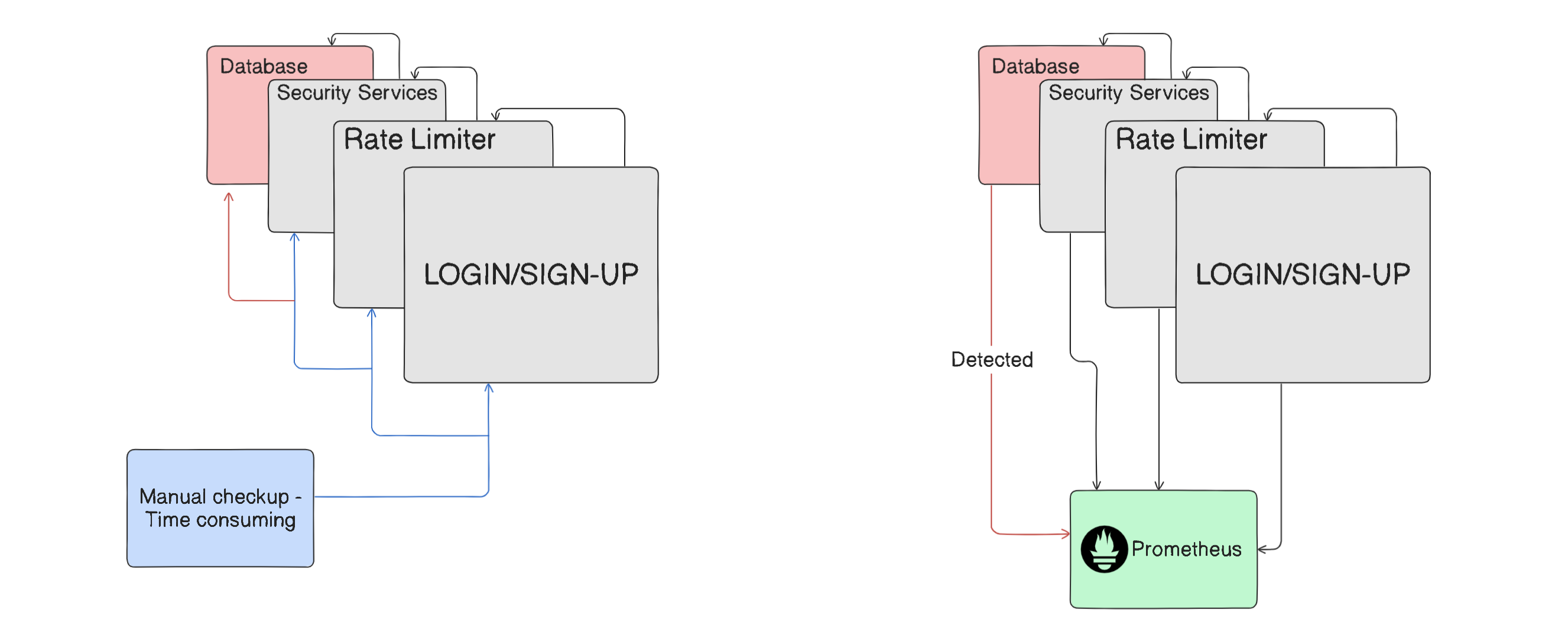
This is exactly where monitoring tools come in. They watch every component in your system and can pinpoint the exact failure point, either as it happens or even before it causes a full outage. Instead of hunting through dozens of services, you get a clear answer: "The database connection failed at 5:32 PM."
In microservices environments where any component could fail at any time, this visibility is crucial. It saves time, reduces downtime, and ultimately prevents losses.
There are plenty of monitoring tools out there, but today we'll focus on Prometheus.
Prometheus
Prometheus is one the most popular monitoring tools and we will seek the reason for, why is it so popular. So let's get started.
Prometheus Server
Inside Prometheus tool itself we have Prometheus server, where all the monitoring work happens. The Prometheus server itself is comprised of three components -
Data Retrieval Workers
Metrics Database
HTTP server
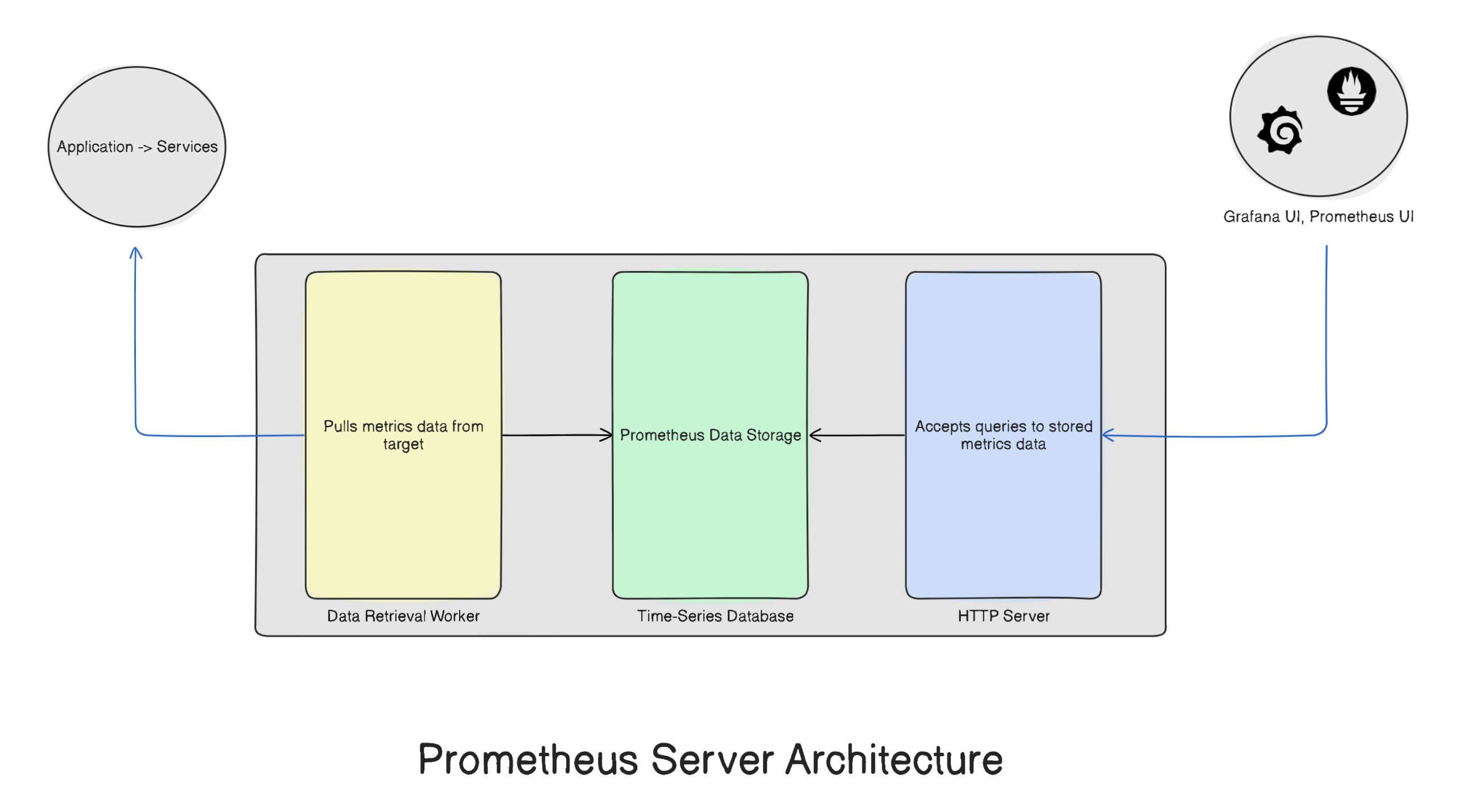
Let us understand each of these components in detail.
Data Retrieval Workers -To monitor any system, you need to track metrics like CPU usage, memory usage, disk space, and network activity. The sources providing these metrics—whether they're applications, services, or servers—are called targets.
But how does Prometheus actually collect these metrics?
It pulls them through HTTP endpoints. Each target exposes an endpoint (formatted as
hostname/metrics) that Prometheus workers can query to retrieve the data they need.Most systems that Prometheus monitors come with these HTTP endpoints built-in. However, some targets don't have default endpoints, and that's where exporters come in.
Metrics Database - Once the workers start collecting metrics, that data needs to be stored somewhere. This is where Prometheus's metrics storage comes in—a time-series database designed specifically for timestamped data like sensor readings, stock prices, or website traffic over time.
Types of metrics - There are 3-different types if metrics in Prometheus which are as follows :
Counter TYPE - Tracks how many times an event has occurred (always increases)
Gauge TYPE - Shows the current value of something that can go up or down, like CPU usage or disk space
Histogram TYPE - Tracks the size or duration of events. For example, it can measure how long a request took to process or the size of response payloads.
HTTP server - To visualize the stored metrics through tools like Grafana or Prometheus UI, Prometheus includes an HTTP server. This server acts as a bridge, allowing visualization tools to query and access the metrics data stored in the database.
PromQL
A query language is necessary to access any database, and similarly, the metrics time series database within the Prometheus server requires its own query language, known as PromQL. Both visualization tools utilize PromQL to function effectively.
Exporters
For Prometheus to collect metrics from target, the target needs to have an endpoint and a lot of them do have by default. Sometimes they don’t, in such case an extra configuration is required to get metrics from such targets. These extra configurations are called exporters.
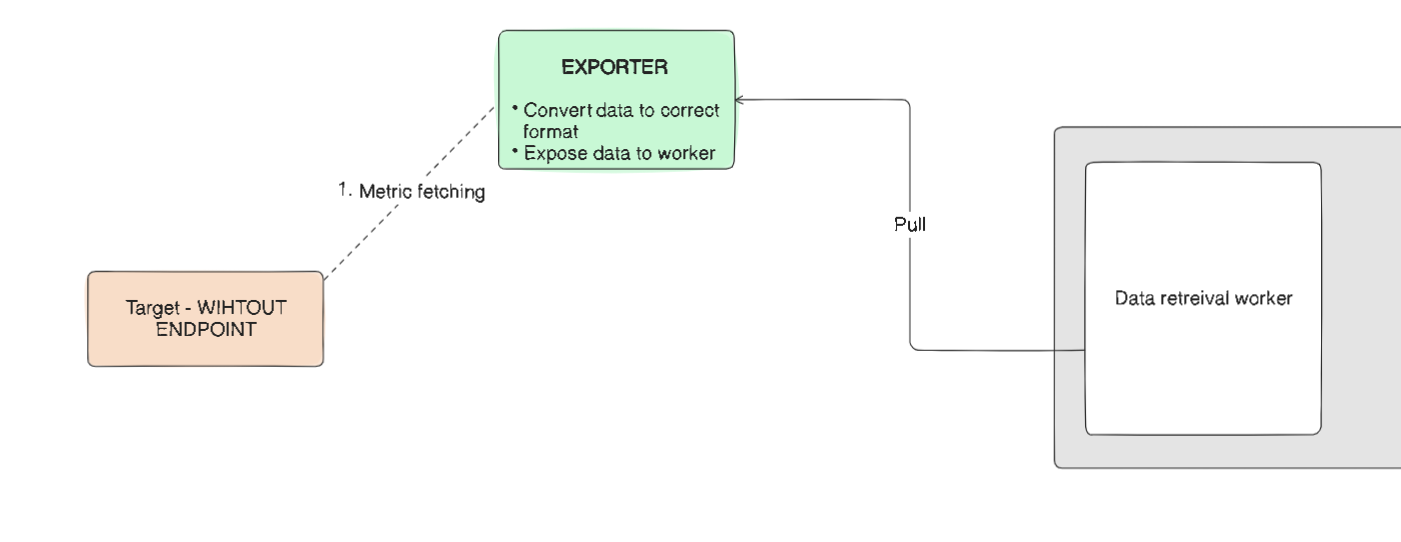
Exporters are scripts or services that extract metrics from targets that don't natively support Prometheus. They convert the data into a format Prometheus can understand and expose their own HTTP endpoints for the workers to pull from.
Why Prometheus is unique ??
Monitoring tools use two main approaches to collect metrics: push and pull. Understanding the difference helps explain why Prometheus stands out.
Push Mechanism: Targets actively send their metrics to the monitoring tool.
Advantages:
Real-time data delivery enables immediate alerts
More efficient—data is only sent when something happens
Scales well with large volumes of data
Disadvantages:
Complex setup requiring agents or APIs on each target
Risk of data overload without proper filtering
Can create network bottlenecks in distributed systems as multiple services constantly push data
Security concerns if authentication isn't properly configured
Pull Mechanism: The monitoring tool fetches metrics from targets on its own schedule.
Advantages:
Simple setup with minimal configuration
The monitoring system controls when and how often to collect data
Better security since targets don't need outbound connections
Prevents network congestion by pulling on a defined schedule
Disadvantages:
- Slight delay in data collection since it happens at fixed intervals rather than in real-time
Prometheus uses the pull mechanism, which sets it apart from alternatives like Amazon CloudWatch, Sentry, Datadog, and Atera—all of which rely on push-based architectures.
Prometheus uses pull mechanism making it unique while its alternatives such as Amazon Cloud Watch, Sentry, Datadog, Atera etc. use push mechanism
Pushgateway
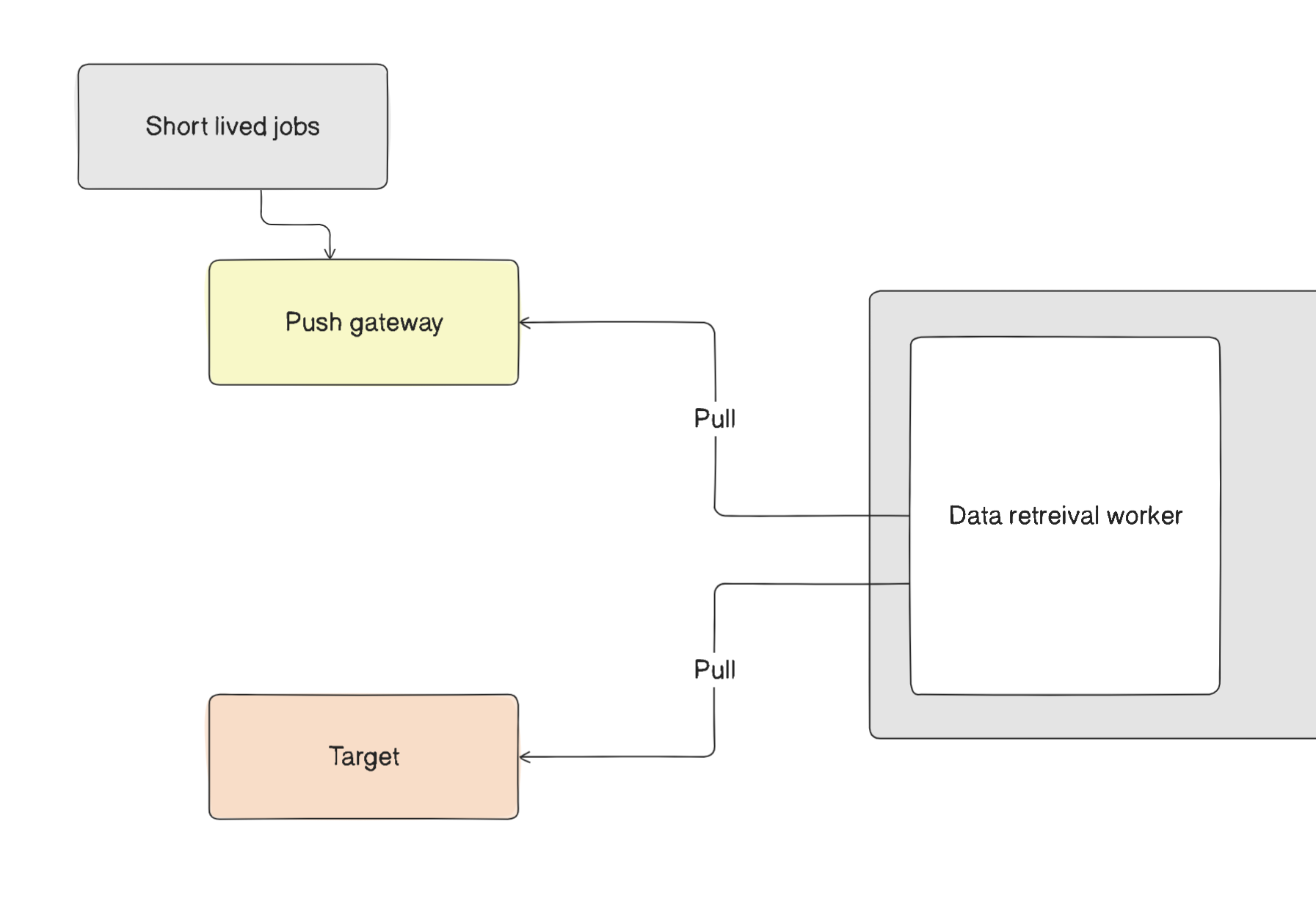
In certain situations, some jobs do not need the pull mechanism because it is unnecessary. For these cases, Prometheus offers the Pushgateway. This allows short-lived jobs to push their metrics reports to the gateway, enabling the data retrieval worker within Prometheus to pull the data from there.
How Does Prometheus Know What to Scrape?
Good question! Prometheus needs two things: which targets to monitor and how often to check them.
This is where the prometheus.yml configuration file comes in. In this YAML file, you define your targets and scraping intervals—basically telling Prometheus what to watch and when.
But what about dynamic environments where services come and go? Prometheus handles this elegantly through service discovery. Instead of manually updating the config file every time a new service spins up, Prometheus can automatically discover targets by integrating with tools like:
Kubernetes
Consul
DNS
And many others
This means Prometheus can monitor your infrastructure as it scales up or down, without you having to manually add or remove targets from the configuration. It's particularly useful in cloud environments where services are constantly being created and destroyed.
Configuring Prometheus
Now that we have a project to monitor, the question arises: how do you define what Prometheus should monitor and how often? This is where Prometheus configuration comes into play. In this section, we will provide a straightforward overview of how to set up Prometheus in your working environment.
The different configurations—Global, rule_files, and scrape—are sections within the Prometheus configuration file, typically named prometheus.yml. These sections define global settings, rules for alerts and recording, and scrape configurations for data collection targets.
Global configuration: The Global configuration in prometheus.yml sets defaults that apply throughout the file unless explicitly overridden in a specific scrape configuration. This includes settings like the scrape interval, which determines how often Prometheus will collect data from the targets. This interval can be overridden for specific targets in their individual scrape configurations.
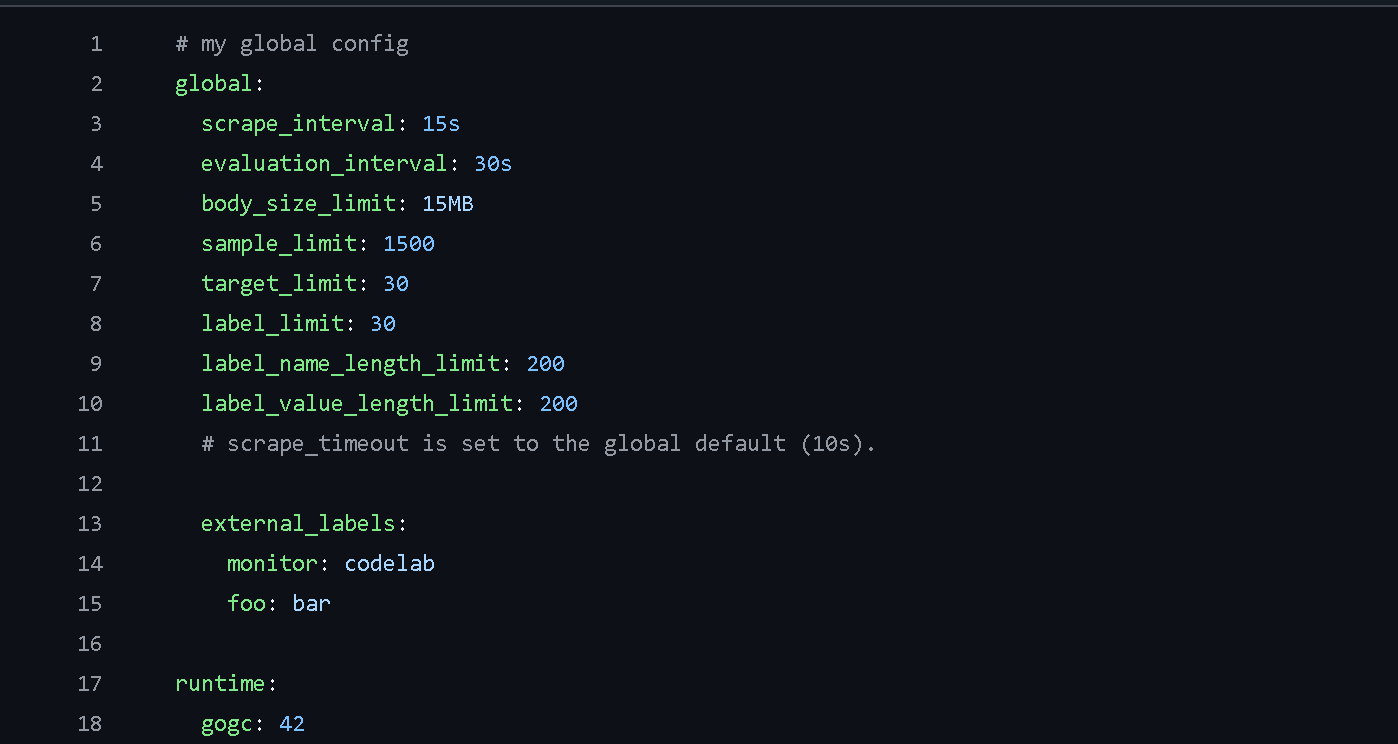
rule_files configuration: The rule_files configuration in Prometheus specifies one or more rule files that Prometheus will load and evaluate. These rules can be used for aggregating metric values or creating alerts based on certain conditions. The evaluation interval for these rules is defined in the Global configuration, determining how often Prometheus will check the rules against the current metric data.
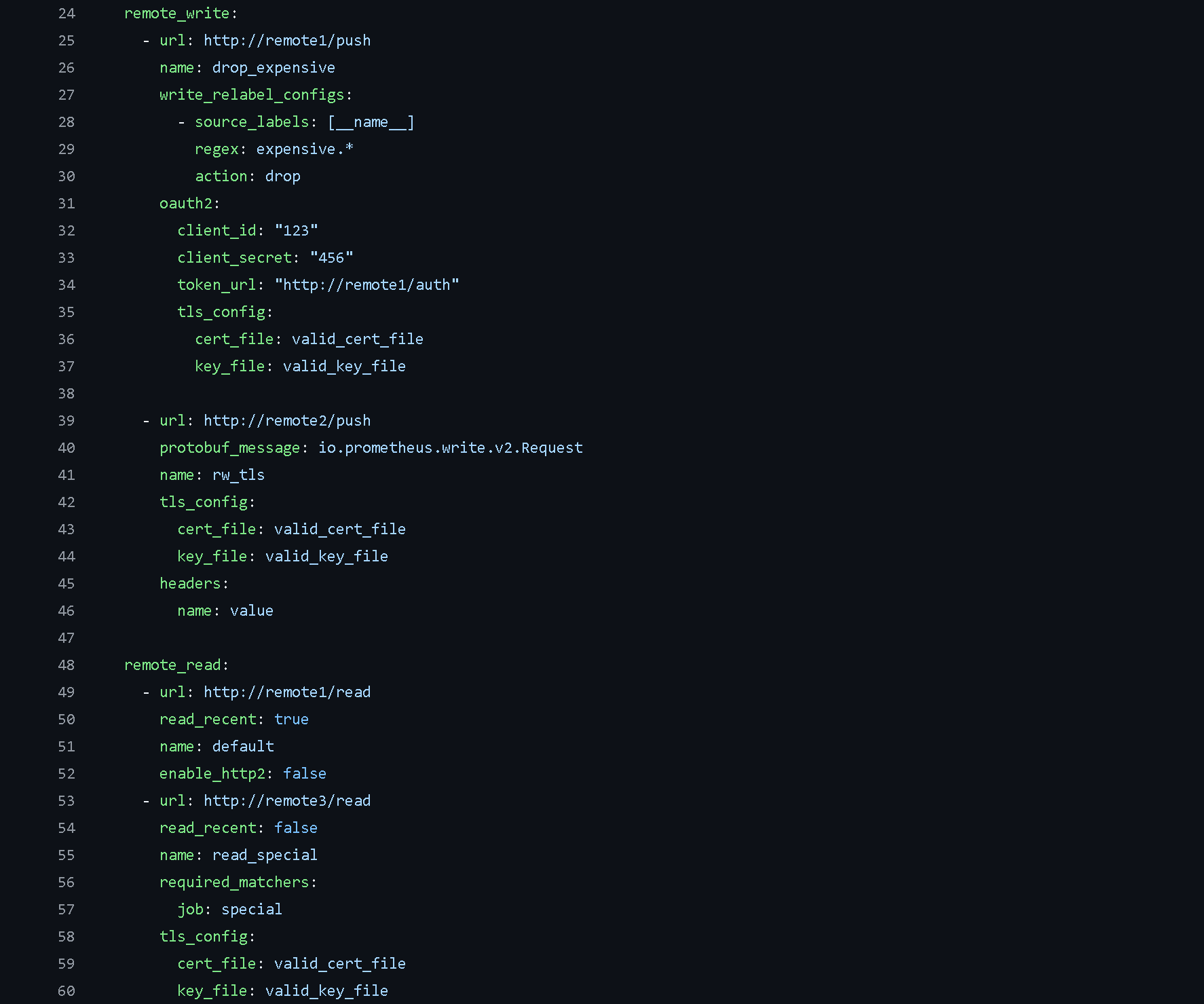
Scrape Configuration - This section specifies the targets that Prometheus needs to collect data from. Prometheus includes its own /metrics endpoints, allowing it to monitor its own performance.
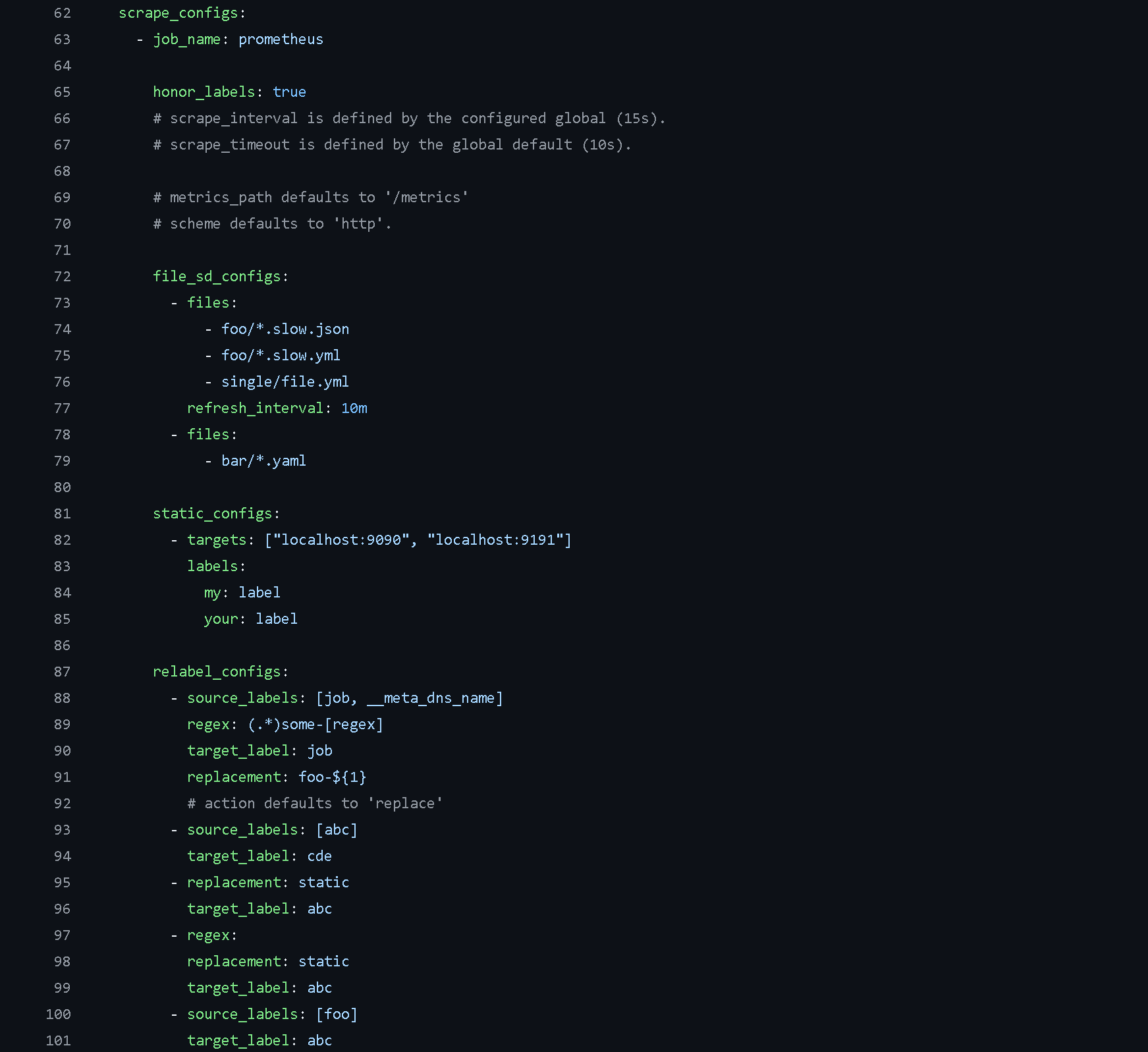
Defining Custom Jobs - In Prometheus, you can define custom jobs to add extra functionality. This involves specifying the job and setting up all the necessary configurations as outlined above.
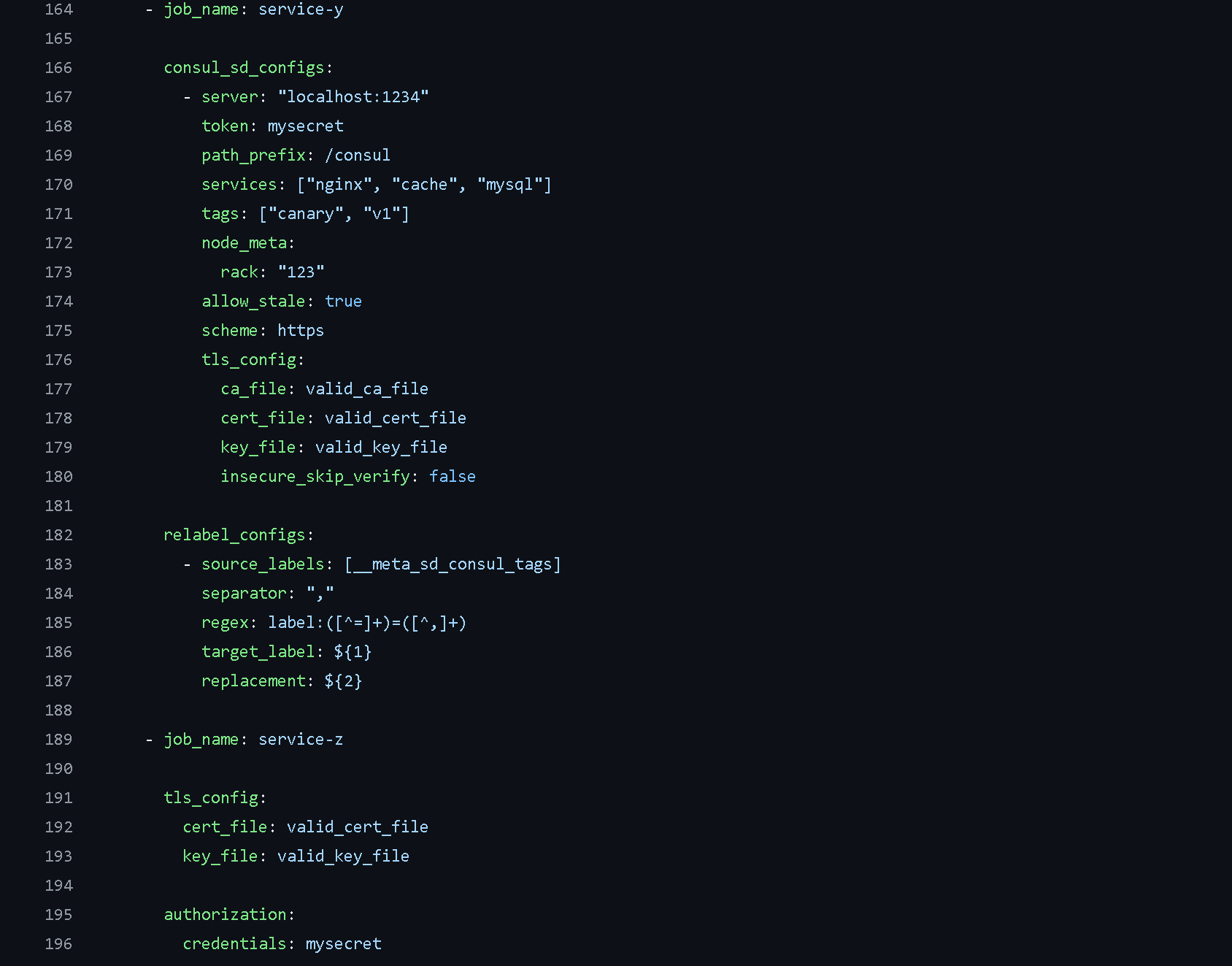
You can view this example configuration from Prometheus’s documentation.
Alert manager
Alert Manager is Prometheus's alert handling component. Here's how it works: when Prometheus detects that a condition has been met—like a metric crossing a threshold—it generates an alert and sends it to Alert Manager.
From there, Alert Manager takes over and decides what to do with it. It can send notifications through email, Slack, PagerDuty, or other channels you've configured. But it does more than just forward alerts.
Key features include:
Grouping: Bundles related alerts together so you get one notification instead of dozens during an incident
Silencing: Lets you mute specific alerts during maintenance windows or planned downtime
Deduplication: Filters out duplicate alerts so you don't get spammed with the same issue
Inhibition: Suppresses lower-priority alerts when a related critical alert is already firing
This means instead of getting overwhelmed by hundreds of alerts when something major breaks, you get a single, organized notification that still shows you exactly what's affected.
Prometheus Data Storage
Once Prometheus collects metrics, it needs somewhere to store them. By default, Prometheus uses local storage—a time-series database stored directly on disk. This local data is stored in Prometheus's custom time-series format, optimized for efficiently handling timestamped metrics.
However, local storage has limitations. It's tied to a single node's disk capacity and durability. If that server fails or runs out of space, you could lose your metrics data.
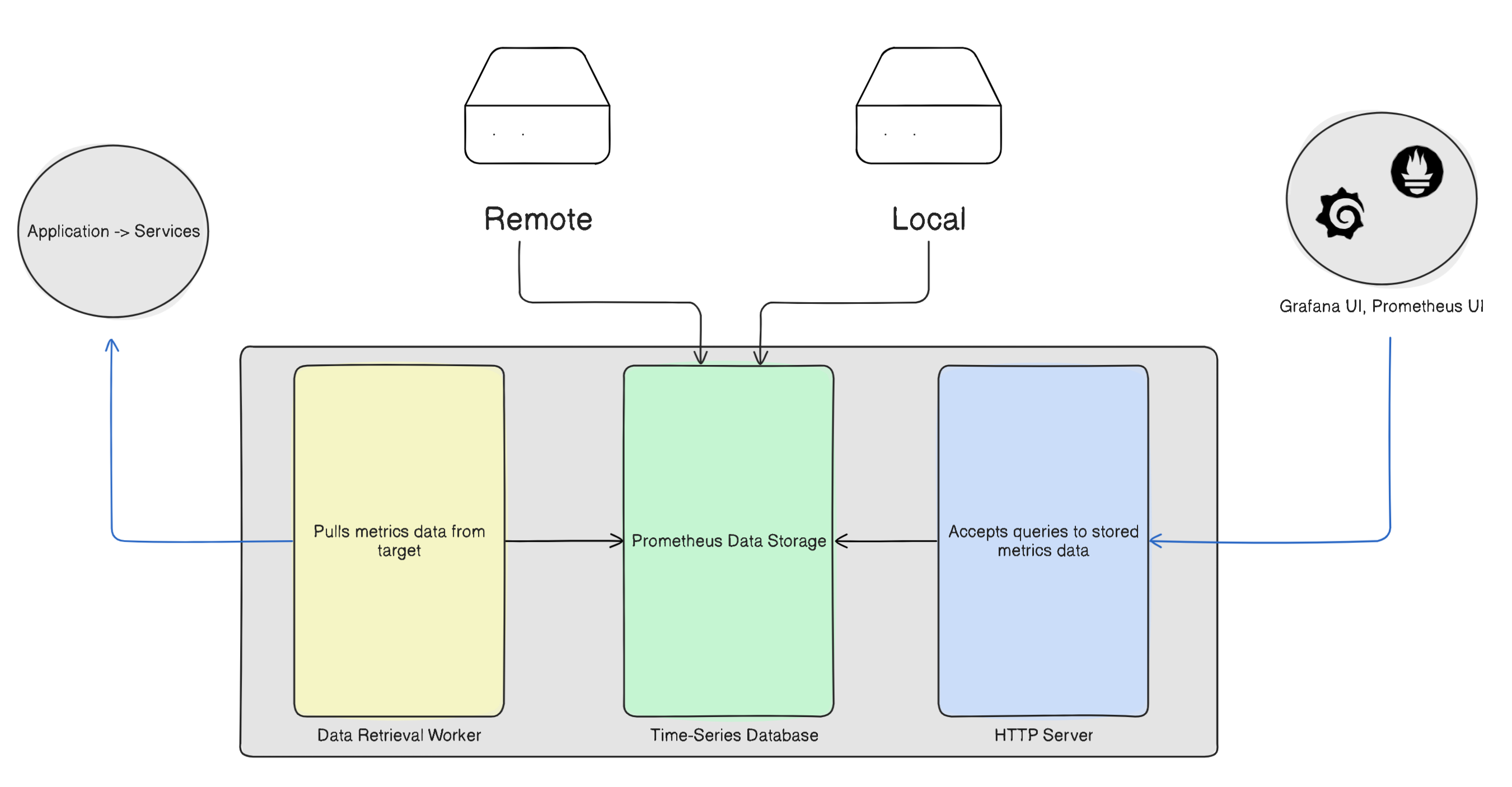
That's why remote storage is often preferred for production environments. Remote storage solutions offer several advantages:
Better durability: Your data isn't tied to a single machine
Long-term retention: Store metrics for months or years without local disk constraints
Scalability: Handle larger volumes of data more efficiently
Prometheus can be configured to write data to remote storage systems like Thanos, VictoriaMetrics, InfluxDB, or cloud solutions while still maintaining local storage for quick queries. This hybrid approach gives you the best of both worlds—fast local querying with the safety net of remote backup.
Thank you for reading the blog, I hope you found it valuable.


